Deriver Documentation

Overview

deriver.app is a PHP web application backed by a MariaDB/MySQL database. It is organized around knowledge bases (KBs): each KB holds structured knowledge and executable rules. The product splits into two complementary areas—an ontology layer (subject–predicate–object triples) and an expert-system layer (IF/THEN-style rules with a dedicated inference UI). Both areas share authentication, styling, and multilingual UI conventions.

This matches parts of the broader DERIVER product narrative: explainable, symbolic inference (you work with explicit triples and rules—not opaque scores), plus visual exploration of structure. What is available today is not a full Description Logic query planner or NL→DL pipeline (see the long-term product roadmap), but a controlled semantic workbench where meaning stays inspectable end-to-end within the triple and rule model.

System architecture

At a high level, ontology data is stored per KB (central table spotl for triples). Rules and KB metadata live in rule and knowledge_base. Server-side PHP loads and saves lists and editors; rule conditions and actions are evaluated on the server, while the Deriver runs in the browser and keeps working state (rules, variables, graph layout) for interactive inference. Navigation between ontology and rules preserves the selected KB and language.

Architecturally, this mirrors the intended split between a declarative knowledge surface (triples and rule text) and a runtime that evaluates conditions and actions with structured, JSON-described outcomes—so engineers and domain owners can reason about behaviour without treating the engine as a black box.

Capabilities

  • Scoped editing and browsing by knowledge base.
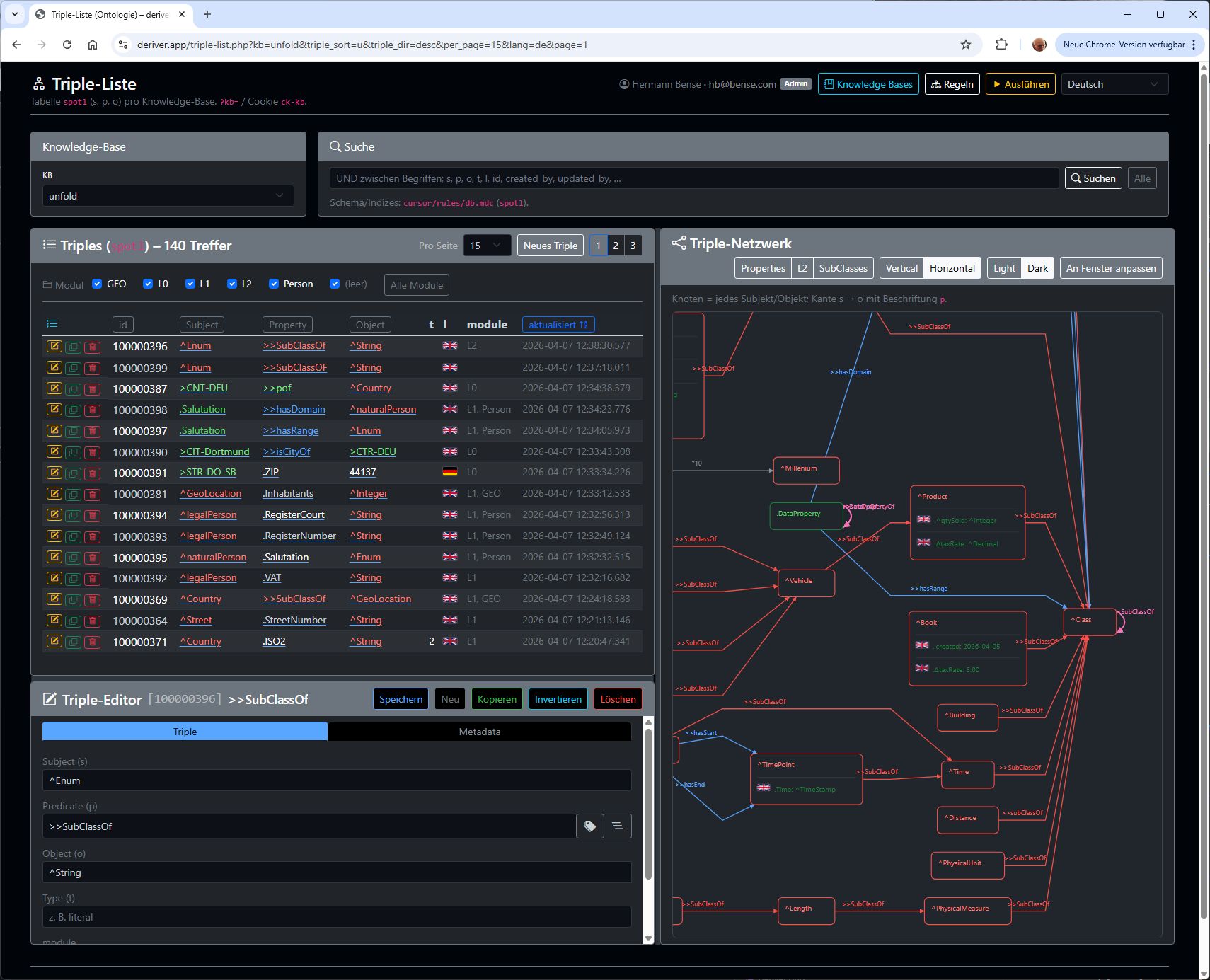
  • Ontology: triple list, split-panel editor, network graph, search, sorting, column filters, pagination.
  • Rules: list and inline editor, link to the Deriver, server-side evaluation of IF expressions and actions.
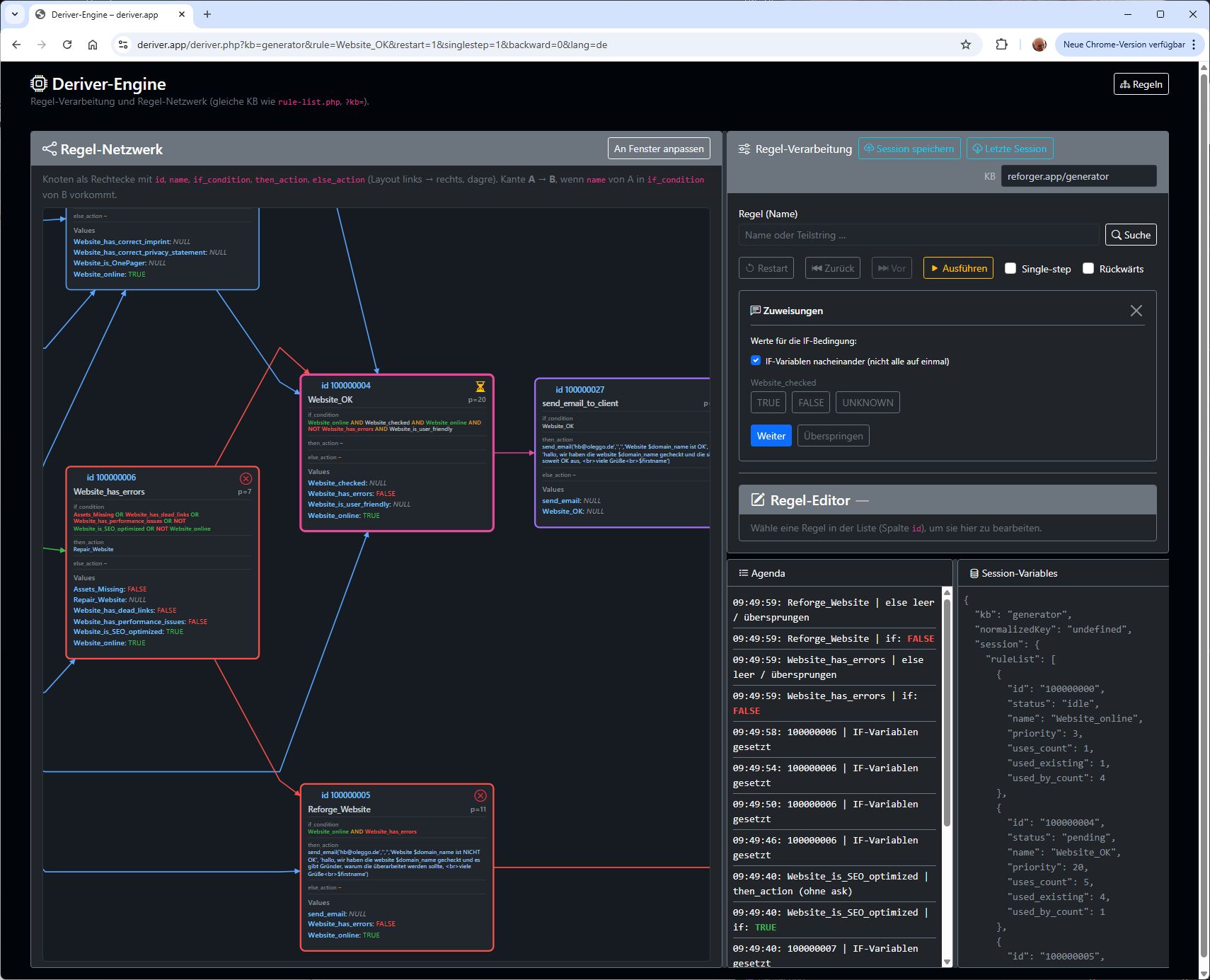
  • Deriver: rule graph visualization, run/restart/step execution, variable assignments, synchronization of IF states with the server where applicable.
  • Modules — optional module tags on triples and rules let you scope lists, graphs, and Deriver views to a subset of the KB for faster development, debugging, and team ownership.
  • Visual thinkingtriple viz (ontology network) and rule viz (rule dependency graph) turn abstract knowledge bases into navigable pictures: you see relationships, follow links, and jump back to list filters—so ontology and knowledge engineering are supported as visual, not only textual, work.
  • Shared UI: responsive layout, light/dark-friendly styling, multiple UI languages.

Ontology Workbench

The Ontology Workbench is where you maintain RDF-like triples (subject – predicate – object) for the active knowledge base. A paginated triple list supports full-text search (terms combined with AND), sorting, optional column filters on subject/predicate/object, and configurable page size. Opening an entry drives a triple editor in a split layout: the list on one side and editing on the other, with tabs for triple fields and metadata (including language or locale hints where used).

A graph view (triple viz) renders triples as nodes and edges. Conceptually, visualization is a comprehension surface—not mere decoration—and that is what we target here: you grasp taxonomy-like structure, how subjects link via predicates, and where to drill down. Visual thinking in this area means using the live network to steer ontology work: click nodes to filter the list, relate patterns spatially, and keep the mental model aligned with the data you edit in the split-panel editor.

This aligns with the grounding spirit of the DERIVER vision: predicates and subjects are concrete terms in your KB; the graph makes those commitments visible while you engineer the ontology.

Modules (the module column on triples, typically comma-separated labels) accelerate development and debugging: you filter the triple list and graph to a slice of the knowledge base, analyse and extend that slice without wading through unrelated rows, and repeat the cycle quickly. For very large ontologies—even on the order of millions of triples—scoping work by module keeps sessions responsive and mentally tractable. The same mechanism supports teams: different people can own named modules and review changes in isolation before they merge into the wider graph.

Ontology editor
Ontology-Editor

Expert System Workbench

The Expert System Workbench covers rules and the Deriver runtime. Rules are stored per KB (conditions, then/else actions, names). The rule list and rule editor let you create, duplicate, save, and delete rules and open the Deriver for the same KB.

Server-side evaluation parses IF expressions, executes action lines, and returns structured results (for example whether a then branch completed, prompts for input, or required variables are missing). For batch consistency of IF truth values across rules, the engine can iterate in a Jacobi-style fixed-point pass: each sweep evaluates all rules against the same snapshot, then applies updates together—so chained effects may require multiple sweeps until no rule newly fires.

deriver.php is the browser-facing inference workbench: it loads the rule graph, shows the network (analogous visualization patterns to the ontology graph), and drives session state for rules and variables. You can run continuously, restart, or single-step; assignments and IF variables are edited in the UI, and results from the server are applied so on-screen IF states stay consistent with evaluation. This is a symbolic, rule-based engine—deterministic for the same rules and inputs—rather than a statistical model.

Rule viz supports visual thinking for knowledge engineering: the rule dependency graph (which rule references which in its IF condition) is drawn on screen so you can reason about control flow and dependencies before and during runs. That echoes an emphasis on explainability via paths and subgraphs—here, in the concrete form of rule-to-rule links and highlighted IF state on nodes, rather than a full DL proof trace.

Modules on rules (optional module field per row) pair with filters in the rule list and Deriver: you can analyse, debug, and grow one part of the rule set at a time instead of the whole KB. That keeps very large rule bases—with thousands of rules—manageable and shortens edit–test cycles. Teams benefit the same way as in the ontology area: assign modules to owners so parallel work stays aligned with clear boundaries.

Explainability in today’s product means: visible IF/THEN/ELSE text, explicit variable bindings, agenda-style feedback from evaluation, and server responses that separate missing inputs, questions (ask), and completed branches—within the rule layer, not yet the full multi-level narrative foreseen for arbitrary DL queries in the roadmap.

Inferencing with Deriver

Getting started

Before you dive into code, you we want you to explain how the template is structured and organized, what support is included, what tools did we have used etc.

Help & Support

Item support includes:
  • Availability of the author to feedback
  • Get assistance with reported bugs and issues
Item support does not include:
  • Customizations and installations

For more details, view the item support policy

You can submit support ticket directly from Support Page

How to find a version of your template

Go to assets/css and open main.css. Here you can find a Version at the very top.

Folder Structure

Slick

Main (root) folder

php

contains contact form processing php file.

css

Template main.css and other plugins CSS files.

scss

Template main.scss and other individual scss files.

fonts

Line (icons) files.

img

Images that are used in the template.

js

Template main.js and other JS plugins.

Image Placeholders

All images are replaced by placeholder due to copyright policy. We cannot include them in the package and sell it.

Layout

Template is responsive and uses Bootstrap grid system. Base layout includes three sections.

  • Header
  • Hero-area
  • Section Content
  • Footer
<html lang="en">
<head>
<!--CSS includes-->
</head>
<body>

        <div id="header-wrap"><!-- header -->
            <nav class="navbar navbar-expand-lg bg-inverse fixed-top scrolling-navbar"><!--navbar--></nav>
        </div>
        <section><!--section content--></section>
        <footer><!--footer--></footer>     

<script>
    //JS plugins includes
</script>

</body>
</html>

Header


Hero Area

Section Content

section this tag gives the top and bottom padding.

Basic Customization

How To Edit Files

You can use whatever text editor you like, even default Text Editor in the OS. But we recommend to use the one with th syntax highlighting such as:

  • Sublime
  • Notepad++

How To Change Fonts

  1. If you are not satisfied with the default font, you can choose from hundreds ones from the Google Fonts. After you are happy with the selected font, click SEE SPECIMEN. You'll be redirected to to font detail. Then click Select this font. Popup window will show with text "1 Family Selected" - click it. Then you can customize your selection by clicking Customize. When you are done copy the text in import tab.
    For example @import url("https://fonts.googleapis.com/css?family=Rubik:400,400i,500"); @import url("https://fonts.googleapis.com/css?family=Poppins:400,500,600");
  2. Then open the main.css file to change fonts and find the @import... element which loads the Google font and place your copied code.
  3. Final step is to change the font family in the css/main.css file. Find body tag on the beginning of the file and font-family inside. Go back to Google Fonts page where you have chose your font and copy the line placed in the Specify in CSS. In this example it is font-family: font-family: 'Rubik', sans-serif; and also do the same for h1,h2,h3 ... tag.

Line Icons

Line Icons includes more than 450 icons that can be easily used on your site. For example you want the download link with the Cog icon.

  1. Go to Line Icons gallery and find the one you need. I our example it is lni-cog. Click the detail, then find and copy .
  2. Place the copied line to your link: Download File

Bootstrap Utilities

Template is using Bootstrap utilities very often. We think that it is better solution as writing all styles for every element into CSS file. It makes the style.css smaller and it is more flexible. You can find more about Bootstrap Utilities.

White Label Apps

Expert systems built with deriver.app can be offered to end users as white-label experiences: the developer hosts the application, while customers interact only through a web browser—similar to a SaaS delivery model. Public-facing pages use the same styling stack as the rest of the product (Bootstrap, shared deriver.css) so you can align branding and keep the inference flow separate from internal ontology and rule editing tools.

Example

Deriver chat session: website analyser
Example of website-analyser session with deriver.chat

expert.php — public expert catalog

The entry point expert.php implements a catalogue of published knowledge bases for end users. Only KBs marked public (COALESCE(public, 0) = 1 on knowledge_base) appear; administrators control visibility while authors keep working in the admin UIs.

  • Locales — UI strings for de, en, fr, es via ?lang=; language badges in the header switch the page without losing the current search query.
  • Search?q= filters KBs by title, slug, or description (SQL LIKE). A fixed bottom bar provides the search form for a compact “app-like” layout.
  • Cards — each public KB is shown as a responsive card (title, description, primary action). The primary button opens deriver-chat.php with that KB’s slug and a defined start rule (rule=START, restart and step flags preset) so the end user lands directly in the conversational expert flow.
  • Session header — the same session user strip as other deriver pages (via deriver_require_session_user_header()) shows whether the visitor is signed in, enabling optional SSO or account flows alongside anonymous use.
  • Assets — Bootstrap 5, Bootstrap Icons, and project deriver.css; optional includes/seo-header.php for meta tags.
  • Resilience — if the public column is missing in an older database, the page falls back to listing all KBs and shows a schema notice so deployments remain debuggable.

Together, this lets a developer ship branded, browser-based expert sessions to end users without exposing triple editors or full rule administration—while the heavy lifting remains in the same deriver stack you use to author KBs.

API

deriver.app exposes small, purpose-built HTTP endpoints for the ontology UI and for rule inference. Server logic is implemented in PHP; structured responses use JSON (Content-Type: application/json; charset=utf-8). The Deriver and triple-list pages use JavaScript (fetch) to call these endpoints in the browser. Authentication follows the same session rules as the main app (signed-in admin vs. public knowledge bases where applicable).

Languages & data formats

  • PHP — request handlers in triple-list.php, rule-evaluate.php, deriver.php.
  • JSON — request bodies (POST with php://input) and JSON responses for APIs below.
  • JavaScript — client-side calls from js/deriver-session.js, js/rule-network-viz.js, and inline scripts in the triple editor (e.g. predicate lookup modal).
  • HTML forms — triple and rule editors still use classic form posts for saves; those are not listed here as separate JSON APIs.

Ontology API

All endpoints are on triple-list.php. Pass the active knowledge base with kb=<slug> (and session as required). Responses are JSON.

Flag preview

Resolves a flag image URL for language/locale cell l (editor preview).

GET triple-list.php?kb=my-kb&triple_list_flag_preview=1&l=en
// Example response
{"src":"…/flags/…svg"}

Enum lookup

Editor support for enumerated values (requires admin session and valid KB). Query parameters: triple_enum_lookup=1, attr, optional editor_l.

GET triple-list.php?kb=my-kb&triple_enum_lookup=1&attr=…&editor_l=…
// Error / empty
{"ok":false,"message":"Nicht berechtigt"}

Predicate lookup

Returns predicate suggestions from the ontology for the triple editor (requires admin session).

GET triple-list.php?kb=my-kb&triple_p_lookup=1
// Shape (simplified)
{"ok":true,"values":[…]}

Inference API

rule-evaluate.php (primary JSON API)

Method: POST only. Body: JSON. Evaluates a rule’s if_condition and processes then_action / else_action branches, returns prompts (ask, value), missing variables, or sync_all_if / admin actions.

POST rule-evaluate.php
Content-Type: application/json

{
  "kb": "my-kb",
  "rule_id": 42,
  "variables": { "pages": "12", "SomeRule": "TRUE" },
  "ui_lang": "en"
}
// Alternative: select by name
{ "kb": "my-kb", "rule_name": "My rule", "variables": {} }

Jacobi-style IF sync over all rules in the KB (client sends current variables):

{ "kb": "my-kb", "action": "sync_all_if", "variables": { … } }

Admin-only maintenance (recompute IF use counts):

{ "kb": "my-kb", "action": "recompute_use_counts" }

then_action / else_action — supported constructs

Action text is line-oriented (separated by newlines or ;). The engine recognises the following. Anything else on a line is currently ignored by the line processor (there is no send_mail() or similar in the codebase today).

  • set(varName, value) — assigns a variable. value may be a quoted string with $otherVar$ placeholders, a variable name, a number, or a numeric expression using variable names (e.g. counter+1).
  • age(argument)argument is a date string (Y-m-d) or a variable holding such a date. Sets age_valid (TRUE/FALSE), age_years, age_months, age_days.
  • http_status(url) — resolves url (literal or variable), performs an HTTP HEAD request, sets http_status (numeric code or empty), http_status_type, and http_status_description.
  • ask(…) — handled by the evaluator (interactive prompts, optional scale / assign variable). Not executed as a simple assignment line.
  • value("…") — first value("…") in the chosen branch supplies free-text capture (ask_value flow in JSON).
set(score, counter+1);
age($birthdate$);
http_status("https://example.com/api/health");

deriver.php JSON helpers

These use query parameters on deriver.php (same KB context as the Deriver page).

Search rules (GET, JSON):

GET deriver.php?kb=my-kb&action=search_rules&q=invoice
// { "ok": true, "rules": [ { "id": "1", "name": "…" }, … ] }

Save Deriver session (POST, JSON body, admin):

POST deriver.php?kb=my-kb&action=deriver_save_session
{ "session_json": "{…}" }

Load last saved session (GET, admin):

GET deriver.php?kb=my-kb&action=deriver_load_last_session
// { "ok": true, "session_json": "…" } or null
Source and Credit

Source and Credit